


Life360: Family Safety & GPS
4.8313.72K Reviews
App Specs
- Version
- 26.40.0
- Updated On
- License
- Free
- Downloads
- 100,000,000+
- Developer
- Life360
- Categories
- Lifestyle
- Platform
- Android, iOS
Screenshots
 Analysis by AppCompare
I find family-location apps most useful when they prevent a string of “Where are you?” messages, not when they turn a map into a substitute for talking. That distinction matters with Life360: Stay Connected & Safe: its value depends on whether everyone in a Circle agrees that sharing a location helps them coordinate and feel safer. I’d treat it as a shared tool, not a way to keep tabs on someone who has not freely agreed to participate.
What the free option tells you about cost
Life360 is a free lifestyle app from Life360, and that makes it possible to try its core approach without paying upfront. There are also in-app purchases, with listed prices ranging from $1.49 to $249.99 per item. That broad range is a reason to check the exact plan and purchase details in the app before committing; it does not, by itself, tell you what a particular household will need or what any one plan includes.
The app has an average rating of 4.4 from around 2.1 million ratings, and more than 100 million installs. Those figures suggest many people have tried it, but they cannot tell you whether your family will be comfortable with continuous location sharing or find the paid features worthwhile. It is rated for Everyone, first appeared on April 7, 2010, and the current version is 25.50.1, with Android 10 as the minimum OS.
Guides and Analysis on Life360: Family Safety & GPS
What you are paying for—and what you may not need
The free experience is the sensible place to begin if your main goal is sharing locations and coordinating everyday plans. I would first see whether the people in your Circle actually use the map and alerts in a helpful way. A paid tier only makes sense if a feature it offers answers a real need for your household; paying simply because a longer feature list sounds reassuring is not a great reason.
The published article describes paid extras such as roadside assistance, stolen-phone coverage and driving analysis. Those may appeal to a household with a new driver or someone who wants extra support on the road, but they are not a universal benefit. Check the current terms, eligibility and exact purchase price before relying on coverage or buying a plan, especially if you already have similar support elsewhere.
How the everyday workflow can help
One useful way to set up a Circle is to agree on its purpose before inviting everyone: perhaps it is for school pickups, late commutes or checking that a driver has arrived. That conversation can prevent a location map from feeling like surveillance. It also gives members a shared standard for when to check the app and when a direct call or message is the more respectful choice.
A practical routine is to use the map to answer simple coordination questions, then send a message only when the map does not settle them. For example, a parent waiting to collect a child can check whether the other driver is nearby instead of repeatedly texting. But a location dot is not a full explanation: it cannot tell you why someone stopped, whether plans changed, or whether they want help. I would avoid treating an unexpected pause as proof that something is wrong.
Worth Reading Before You Choose

QuizzLand Review: A Good Fit for Short Trivia Breaks, Not Every Player

Basketball Stars: Multiplayer Is Fast, but Can It Recover When Matches Go Wrong?

WEBTOON Turns Phone Updates Into a Better Reading Routine

Link to Windows Runs on Shared Habits, Not Social Feeds

How Alibaba.com Dominates the B2B Marketplace

Metro's Quiet Rise: Redefining Mobile Communication
It is also worth agreeing on what happens when someone does not want to share for a while. The original app experience describes adjustable location-sharing settings, which can make temporary sharing more comfortable for a trip. Before relying on that arrangement, make sure everyone understands how to change their own settings and that opting out will not be treated as suspicious. Clear expectations are more useful than an unspoken rule that every member must always be visible.
Keeping Tabs on Your Circle
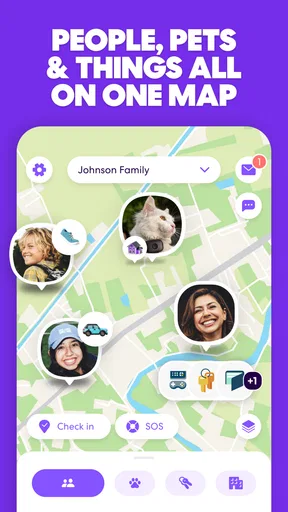
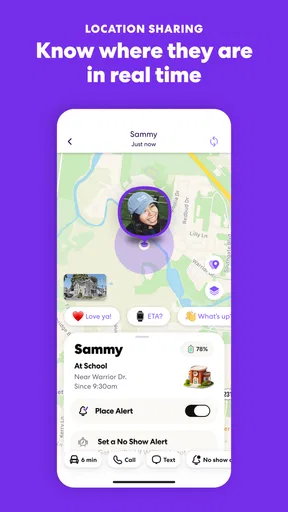
First off, let me tell you about the main feature that drew me in: the ability to create your own "Circle". This is essentially a group where you can add family members or friends. Once everyone’s in, you can see their real-time location on a map. It’s comforting to know where everyone is, especially when plans change at the last minute.
Now, I know what you’re thinking—privacy concerns, right? Life360 has thought of that. You can adjust location sharing settings to suit your comfort level. Want to share your location only during a road trip and then ghost everyone? Totally doable.
Safety Features Galore
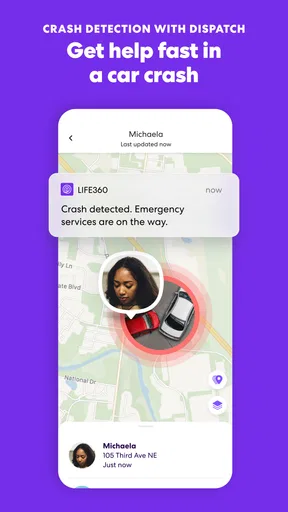
Besides just tracking locations, Life360 has some safety features that are pretty impressive. The app includes crash detection and emergency response capabilities. If a family member is involved in an accident, the app can notify other Circle members and even contact emergency services if needed. Talk about peace of mind!
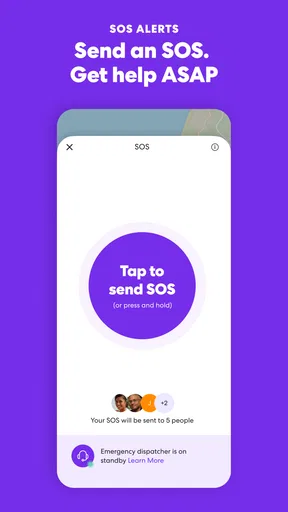
There’s also a feature for sending out help alerts. Just a tap, and your Circle gets a notification that you need assistance. It’s like having a personal alarm system in your pocket.
Perks of Premium
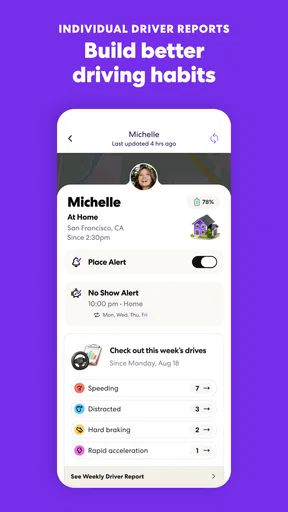
While the free version of the app is great, some features are locked behind a premium subscription. With a Premium plan, you get access to additional perks like 24/7 roadside assistance and stolen phone coverage. Plus, the driving analysis feature is pretty cool; it gives insights into driving habits, which is great if you’ve got a new teen driver in the family.
But hey, if you’re on a budget, the free version still offers a lot of value. It’s nice to know you can upgrade if you ever feel the need.
When another approach may be better
Compared with asking everyone to share a location through a phone’s built-in tools or sending a quick “I’m here” message, Life360 brings family members into a dedicated Circle and combines location sharing with safety-oriented features. That can be convenient when several relatives coordinate regularly. A basic map-sharing option may be enough, though, if all you need is to meet at a restaurant or confirm one arrival; using a more involved app for occasional check-ins can add friction without adding much value.
It is not the right fit for every family. Someone who dislikes ongoing location sharing, or who would feel pressured to keep it enabled, may be better served by occasional check-ins and direct calls. It may also be unnecessary for a household that already has a comfortable routine and no need for shared alerts. I would not recommend installing it as a way to resolve a lack of trust: a map can show where a phone appears to be, but it cannot repair a relationship or explain a person’s choices.
Trade-offs to consider before relying on it
Location information is only useful when people understand what it means and choose to participate. A phone’s position is not the same as a person’s confirmed wellbeing, and a safety alert should not be treated as a replacement for emergency judgement. If something seems urgent, contact the person or local emergency services directly rather than assuming the app has handled the situation.
There is also a social trade-off: convenient visibility can become uncomfortable if one person checks the map constantly or expects instant explanations for every stop. I would set simple boundaries together, such as using the Circle for practical coordination rather than monitoring someone’s schedule. For a teen driver, discussing what driving insights are for before looking at them can make the feature feel like coaching instead of punishment.
Before purchasing, compare the specific paid benefits with coverage or services you already have and read the terms that apply to your location. The price range for in-app purchases is wide, and the value depends on the item selected. If a feature is important for a trip or a driver, confirm how it works and who can use it rather than assuming that every purchase covers every person in the Circle.
Who is most likely to get value
I can see this working best for families that coordinate rides, have members travelling at different times, or want a shared way to check arrivals. It can also suit a household with a new driver if both the driver and family agree on how safety tools and driving analysis will be used. The benefit is less about watching a moving dot and more about reducing avoidable calls while keeping a way to ask for help close at hand.
For a realistic example, imagine two adults juggling a school pickup while one is delayed in traffic. The person waiting can check the Circle, see that the other phone is still on the route, and adjust the plan without a stream of messages. If the location does not update or looks confusing, a direct call is still the sensible next step. The app can make coordination easier, but it cannot guarantee that a device is connected or that the person carrying it is safe.
New users should also make a small trial period part of the decision. Invite only the people who want to participate, use the app for one clear routine, and see whether it genuinely saves effort. If everyone finds themselves checking it anxiously or arguing about settings, that is useful feedback: turn sharing off or choose a simpler approach. You do not need to buy anything to learn whether the basic Circle workflow fits your family.
Putting It All Together
All in all, Life360: Stay Connected & Safe is more than just a location tracker. It’s a comprehensive app designed to keep you and your family safe, and it does so without being intrusive. Whether you need to coordinate school pick-ups, keep an eye on a new driver, or just ensure your loved ones are safe, this app has got your back.
So, if you’re looking for an app that offers peace of mind and a touch of safety, give Life360 a go. It’s like carrying a little guardian angel in your pocket, and who doesn’t need that?
My buy-or-skip verdict
I would try the free experience if the people in your household want a shared location and safety tool, then judge it by whether it makes a real routine easier. I would skip paid features until you have identified a specific benefit you will use and checked its terms and cost. If your family prefers privacy, only needs an occasional arrival message, or would find location sharing stressful, a simpler alternative is likely the better choice.
Pros
- Real-time location tracking enhances safety.
- Easy to set up and user-friendly interface.
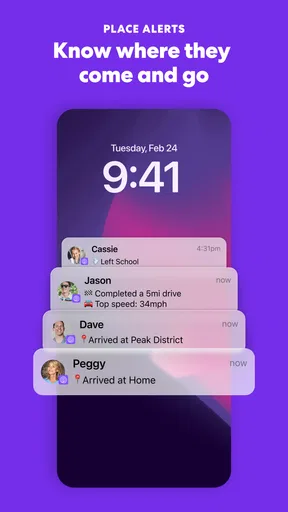
- Geofencing alerts for arrivals and departures.
- Panic button for emergencies provides peace of mind.
- Battery usage is optimized for longer tracking.
Cons
- Limited features in the free version.
- Occasional GPS inaccuracies reported.
- Some privacy concerns with data sharing.
- Premium features can be expensive.
- Notifications can be overwhelming.
FAQs for Life360: Family Safety & GPS
What is Life360 and what are its main features?
Life360 is a family networking app designed to keep loved ones connected and safe. Its main features include real-time location sharing, place alerts, and crash detection. Users can create private circles to share locations with family members and receive notifications about their whereabouts, ensuring peace of mind and enhanced safety.
Is Life360 free to use, and what are the benefits of upgrading to a premium plan?
Life360 offers a free version with basic location sharing and alerts. However, premium plans provide additional features like location history, unlimited place alerts, and emergency assistance. Upgrading gives access to more detailed safety tools, ensuring comprehensive coverage for families who prioritize security and connectivity.
How does Life360 ensure the privacy and security of my location data?
Life360 is committed to user privacy, using end-to-end encryption to protect location data. Users control who can see their location by creating private circles. The app does not share data with third parties without consent, ensuring that users’ information remains secure and private at all times.
What are the device compatibility requirements for Life360?
Life360 is compatible with both Android and iOS devices. It requires Android 8.0 or later and iOS 13.0 or later. The app works best with a stable internet connection and requires GPS and location services to be enabled for accurate tracking and notifications, ensuring smooth operation across devices.
How reliable is the crash detection feature in Life360?
Life360's crash detection feature uses advanced sensors and algorithms to detect serious accidents. It sends emergency alerts to circle members and can dispatch emergency services if needed. While not infallible, it's a valuable tool that adds an extra layer of safety for users on the road, providing prompt assistance during emergencies.


